
Follow the change, not only the last attachment
Read the correspondence leading to a revised drawing, specification, quantity, or due date. The sequence gives the file or decision its working context.
EMAIL HISTORY FOR MANUFACTURING
RFQs, quotations, drawing revisions, approvals, and delivery changes often live in email. Keep that history readable when subjects change and teams hand the work over.
Real Gmail, every current feature, free during beta. No card and no automatic paid conversion.
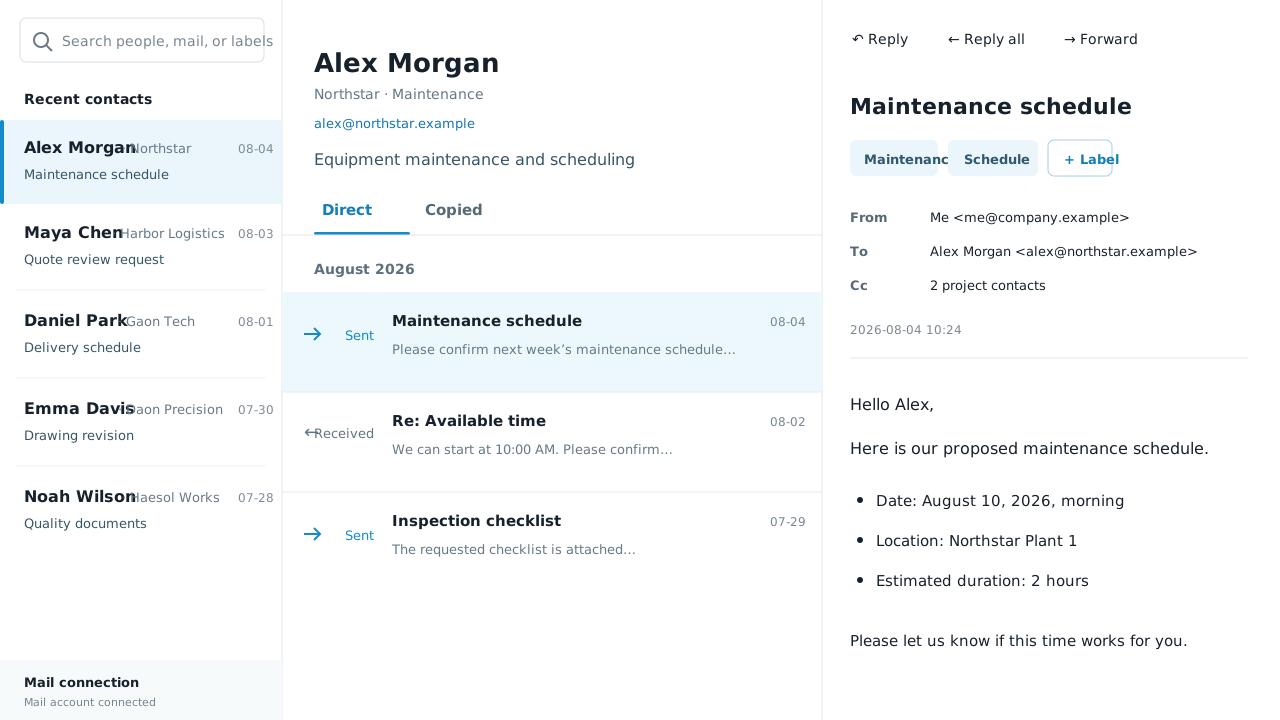
Ordinal Doctrine Mail is a Gmail layer for the correspondence around manufacturing work. It complements ERP and PDM records; it does not ask the company to replace them.
WHAT CHANGES
A production issue is rarely explained by the latest email alone. The useful record starts earlier—with the request, quotation, revision, approval, and schedule that led to it.
Read the correspondence leading to a revised drawing, specification, quantity, or due date. The sequence gives the file or decision its working context.
A colleague can begin with the customer or supplier and retrace the exchange instead of asking the previous owner to reconstruct it from memory.
Search the people, wording, and project markers connected with a quality issue, delivery change, or approval before the team decides what happened next.
IN THE WORK
The same person-centred history supports the commercial and operational stages of the job without forcing a new email habit on every participant.
Open the buyer, customer, estimator, or supplier contact and review the enquiry, quotation, clarification, and commercial response in order.
Search for the drawing number, specification phrase, or your own project marker. Read the surrounding messages before treating an attachment as final.
When quantity, packaging, inspection, or delivery timing moves, the chronological exchange preserves the path from the original commitment to the latest position.
BUILT FOR THE RECORD
Manufacturing teams do not need another database for its own sake. They need the email evidence to be easier to retrieve at the moment a project, supplier, or customer question appears.
New owners can open the relevant customer or supplier, understand the prior exchange, and continue from the same history without changing the external party’s workflow.
A drawing number or project marker can lead back to the messages that requested, explained, approved, or scheduled the change—not just the newest file.
When a delivery or quality question arises, the team can inspect the prior wording and dates before deciding whether the issue came from a request, interpretation, confirmation, or later change.
Compose or reply after reviewing the customer’s history. The response goes through Gmail only when the user presses Send.
QUESTIONS
No. ERP and PDM remain the right systems for structured orders, items, drawings, and controlled data. Ordinal Doctrine Mail makes the human correspondence around that work easier to retrieve in Gmail.
You can search message content and add your own markers for a project, order, drawing, vessel, line, or another term your team already uses.
No. Customers and suppliers continue using ordinary email. The changed experience is inside the Gmail workspace connected by the Ordinal Doctrine Mail user.
Yes. This is a real Gmail-connected beta, not a simulated mailbox. Anyone with an eligible work Gmail account can connect and use every current feature free during beta.
FOUNDING BETA
Connect a work Gmail account and use every current feature immediately. No application, invitation or card.
Start free beta