
Stop reopening disconnected subject lines
Select the person once and read the exchange in date order. A new subject no longer hides the earlier quotation, answer, or decision.
GMAIL CONTACT HISTORY
Choose a customer, supplier, or partner and read the messages you exchanged in one chronological history—across changing subjects, threads, and copied recipients.
Real Gmail, every current feature, free during beta. No card and no automatic paid conversion.
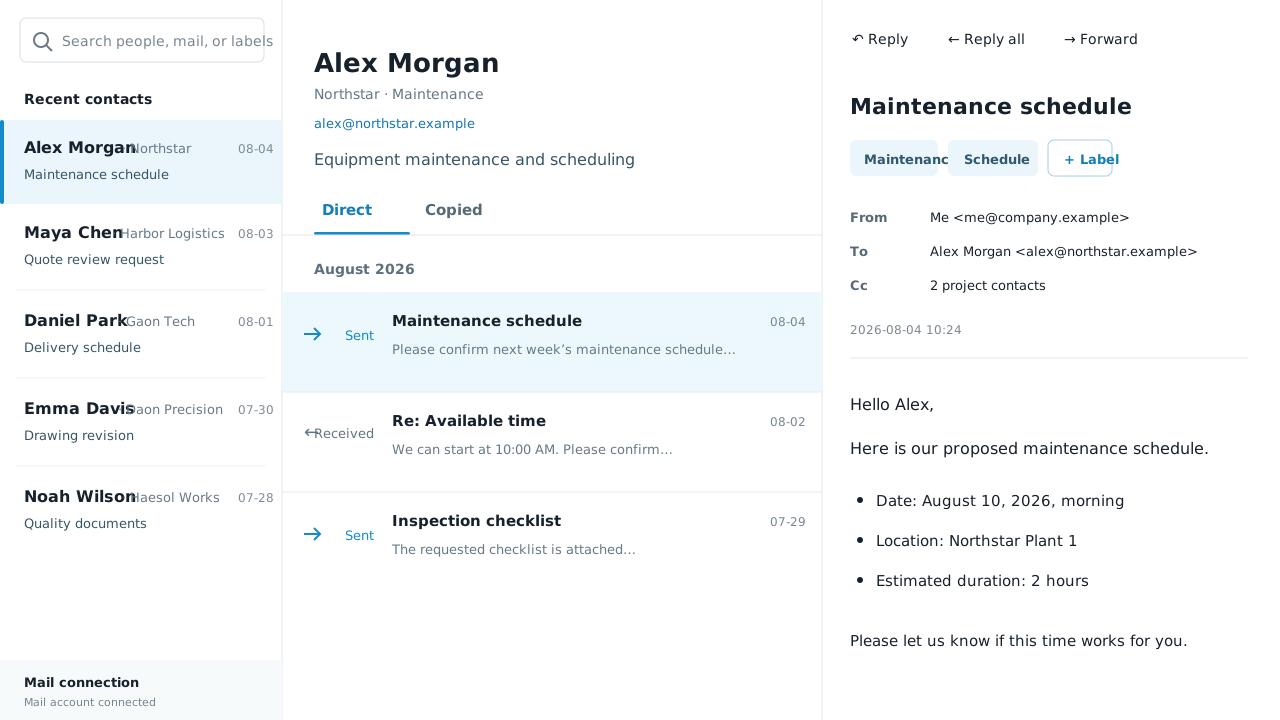
Gmail remains the system of record. Ordinal Doctrine Mail adds a people-centred view on top, so you can understand the relationship before you answer the latest message.
WHAT CHANGES
A relationship rarely stays inside one perfect thread. New subjects are started, colleagues are copied, and decisions are split across months of messages. The person is the stable point.
Select the person once and read the exchange in date order. A new subject no longer hides the earlier quotation, answer, or decision.
See what was asked, what changed, and what your team already said before sending the next message. This is especially useful after a handover or a long gap.
Search names, message content, and the markers you add. You do not need to remember a Gmail operator or the exact wording of the original subject.
IN THE WORK
The workflow stays close to email: open the person, inspect the record, and continue the conversation. No mailbox migration is required.
You review the Google permissions before connecting. Ordinal Doctrine Mail uses Gmail access to build the contact history and to send only when you press Send.
Recent contacts appear like conversations. Select one to bring together the messages exchanged with that address, then move through the history by time.
Search within the record, add a marker for later retrieval, open the original message when needed, then compose, reply, or forward from the same workspace.
BUILT FOR THE RECORD
The product is intentionally a layer over Gmail. It changes how you retrieve context without asking the company to replace its email addresses, folders, or delivery system.
Messages are arranged by when they happened, so the change from first enquiry to final answer can be followed without jumping between thread pages.
Start with a contact when you know who was involved, use content search when you remember a phrase, or add a marker for the way your team names a project.
The original messages remain in Gmail. Ordinal Doctrine Mail provides another way to see and act on them rather than creating a separate archive to maintain.
Review the prior exchange and respond without returning to a conventional inbox. Sending occurs only after the user composes the message and presses Send.
QUESTIONS
No. It connects to the Gmail account you already use and presents the same work as a people-centred history. Your original email remains in Gmail.
Yes. The contact history is based on the person involved in the exchange, not a single subject line, so messages can be brought together across different threads.
Yes. You can compose, reply, reply all, and forward. Ordinal Doctrine Mail sends only when you take that action; it does not send automatic campaigns.
Yes. Every current feature is free during the beta. No card is required and beta access does not automatically convert into a paid plan.
Yes. Account controls let you disconnect Gmail and request deletion of the data stored for the connected workspace.
FOUNDING BETA
Connect a work Gmail account and use every current feature immediately. No application, invitation or card.
Start free beta